
Your site can look expensive and still be hard to understand.
Not because the colors are wrong. Not because you missed a clever keyword. Because the structure beneath the page is saying something different from what the design is saying.
That structural layer starts with headings. If you have ever chosen “Heading 2” because the font size looked right, this is for you.
This is Build Log #1 in the Basic SEO series for new business owners. It is deliberately not a keyword-research lesson. Before you chase search volume, rewrite title tags, or ask AI to “make the page SEO friendly,” you need a page that has a readable outline. A visitor should be able to scan it. A screen-reader user should be able to navigate it. A search engine should be able to find the primary topic and the sections that support it.

The build: turn visual text into a meaningful outline
A heading is not a font-size setting. It is a statement about the role a piece of text plays in the document.
Think of a web page like a report. It has one main subject, a few major sections, and sometimes smaller points inside those sections. The HTML heading levels describe that outline.
<h1>Title of the whole page</h1>
  <h2>Main section</h2>
    <h3>Sub-point inside that section</h3>
    <h3>Another sub-point</h3>
  <h2>Another main section</h2>
That is the idea. The H1 states the page’s subject. H2s introduce the main sections of that subject. H3s belong inside the H2 above them. H4 through H6 exist for deeper nesting, but most small-business pages do not need them.
The World Wide Web Consortium describes headings as a page’s organizational structure—effectively a table of contents—and recommends nesting them by level without skipping levels. [1]
| Level | Its practical job | Small-business default |
|---|---|---|
H1 |
States the single subject of the page | One clear primary H1 |
H2 |
Introduces a major section of that subject | Use for real sections |
H3 |
Introduces a point within an H2 section | Use only when it belongs to the H2 above |
H4–H6 |
Adds deeper nesting | Rare on ordinary service, product, or blog pages |
The test: Read only the headings from top to bottom. If they tell the story of the page in a sensible order, the structure is probably doing its job.
Why this belongs at the beginning of an SEO course
Google does not award a ranking trophy for a specific number of H1s. Its own SEO Starter Guide says that semantic heading order is excellent for screen-reader users, while Google Search does not rely on perfect HTML semantics because the web is messy. [2]
That is not a reason to ignore headings. It is the reason to use them for their actual job: clear organization for people, assistive technology, and the systems trying to understand content in context.
Google also recommends breaking content into sections and using headings to help readers navigate. It says the words in page headings can be one of the inputs used to generate a title link in search results. [2] More importantly, heading structure makes a page easier to maintain. When you return six months later—or send the page to a developer or an AI assistant—you can see what each part is meant to do.
For a new business owner, that is the leverage. You do not need to memorize an algorithm. You need to stop letting presentation decisions accidentally become structural decisions.
The 30-second audit: check any page without buying a tool
You can run the first audit in Chrome or Edge. Inspect is built into the browser, and it shows the HTML the browser actually received and rendered.
Step 1: Open the page and inspect it
Open the homepage, a best-selling product page, or your most visited article. Right-click anywhere on the page and choose Inspect. A developer panel will open.
Step 2: Count the H1s
Click inside that panel and use Ctrl + F on Windows or Cmd + F on Mac. Search for <h1.
For the cleanest authoring pattern, the match counter should show one. If it shows zero, the page has no declared main subject. If it shows several, inspect what those headings are trying to do. A logo, promotion banner, sitewide widget, or repeated card title may be taking structural space it does not need.
Step 3: Read H2s and H3s as an outline
Search for <h2, then <h3. Click through each match and read the heading text in page order. Ask three questions:
- Does each H2 introduce a real section of the page?
- Does every H3 belong to the H2 immediately above it?
- Does the sequence read like a useful outline to a person who has not seen the design?
The W3C’s own quick check uses the same core questions: start with an H1, avoid skipped heading levels, make the heading text reflect the content that follows, and ensure the headings represent the content structure. [1]
Step 4: Find text that only looks like a heading
The common mistakes are visual, not technical. A price looks important, so somebody makes it an H2. A “Free shipping” banner looks big, so it becomes an H1. A testimonial card title uses an H3 only because a template designer wanted bold text.
If a piece of text is not the title of content that follows it, it probably is not a heading. Style it with CSS instead.
The same product page: broken and fixed
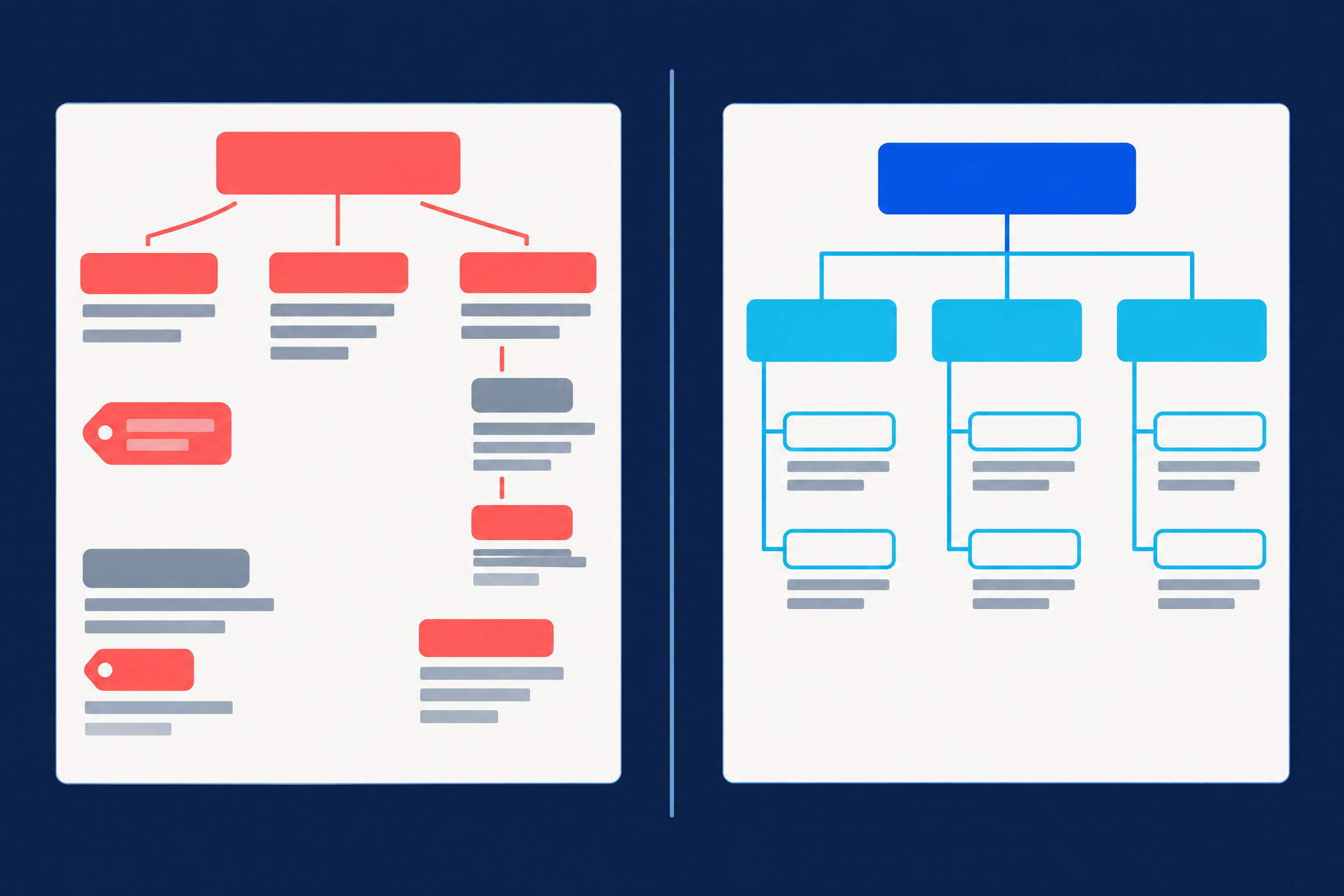
Imagine a product page for a coffee roaster. Both versions can look identical to a visitor. Their underlying structure is completely different.
Broken structure
<h1>Welcome</h1>
<h1>Ethiopia Guji</h1>
<h2>$18.00</h2>
<h4>Tasting notes</h4>
<h2>Peach</h2>
<h2>Jasmine</h2>
<h1>Free shipping!</h1>
This page has three competing page subjects. The price is incorrectly treated as a section. The tasting notes jump from H2 to H4. “Peach” and “Jasmine” are written as peers of major sections instead of details inside the tasting-notes section.
Clear structure
<h1>Ethiopia Guji</h1>
<h2>Tasting notes</h2>
  <h3>Peach</h3>
  <h3>Jasmine</h3>
<h2>Roast and origin</h2>
<h2>Shipping</h2>
The price can still be large. The shipping banner can still be bright. They just do not need heading tags to look important.
The six rules that fix most pages
| Rule | What it means in practice |
|---|---|
| Give the page one primary subject | Write one descriptive H1 for the page. It should broadly align with the page title and what a visitor expects to find. |
| Descend in order | Use H1 → H2 → H3 when you need nesting. Do not choose a level because it happens to be the right visual size. |
| Choose meaning first; style second | Pick the HTML tag for the text’s role. Use CSS to set the font size, weight, color, and spacing. |
| Make headings introduce real content | A heading should have a section, paragraph, list, image, or other material under it. An empty heading is decoration, not structure. |
| Use specific words | “How we roast in small batches” tells a reader more than “Our process.” Meaningful headings are better navigation. |
| Audit the template, not only the page copy | Logos, sidebars, footer widgets, card grids, accordions, and promotional strips can add heading tags you did not write. |
Where heading tags hide in common builders
| Platform | Where to check first |
|---|---|
| WordPress | Select the heading block and inspect the H1–H6 selector separately from typography controls. |
| Shopify | Product titles are often the H1 by theme default. Review category and rich-text section headings in the theme customizer. |
| BigCommerce | Check Page Builder text widgets, then inspect product and category templates for theme-level headings. |
| Squarespace or Wix | The text toolbar’s Heading 1, Heading 2, and similar options map to HTML tags, even when the interface presents them as visual styles. |
| Webflow | Use the element settings panel for the tag; a CSS class controls size independently. |
| AI builders | Ask the builder to show the rendered heading hierarchy and correct it to one H1 with no skipped levels. Then verify the result yourself in Inspect. |
Use AI as an auditor, not as the source of truth
AI is useful here because it can turn a long HTML page into an ordered outline quickly. It is not useful when you trust it without checking the page itself.
Copy the page’s rendered body HTML by opening Inspect, right-clicking the <body> element, and choosing Copy → Copy outerHTML. Then use this prompt:
Here is the rendered HTML for one page of my website.

1. List every heading tag in the order it appears, showing the level and text.
2. Count the H1 headings. Flag any issue with the primary page subject.
3. Flag every skipped level, such as an H2 followed by an H4.
4. Flag anything tagged as a heading that does not introduce content, including prices, badges, button labels, and slogans.
5. Show a corrected outline and explain the reason for each structural change.

Do not rewrite my copy. Do not change design. Only assess the heading structure.

[paste HTML here]
Then compare the AI’s answer against the browser audit. AI can miscount, miss dynamically inserted material, or analyze the source template rather than the finished page. Inspect is your ground truth because it shows the page as the browser has built it.
Your one-page heading checklist
Run this checklist on three pages first: your homepage, your most important product or service page, and your best-performing blog post.
- The page has one clear H1 that states its primary subject.
- The H1 broadly agrees with the page title and visitor intent.
- The outline does not jump down levels without a parent section.
- Every H2 is a true section of the page.
- Every H3 belongs inside the H2 above it.
- Prices, badges, buttons, testimonials, and banner slogans are styled text—not headings.
- Every heading introduces material beneath it.
- Headings use clear, specific language instead of filler labels.
- Sitewide templates are not introducing stray headings.
- Reading the headings alone gives you a useful summary of the page.
If that final point is true, stop. You have made a real improvement. Do not turn a 20-minute structural repair into a two-week rewrite.
What comes after headings in the Basic SEO series
This post is the foundation because every later lesson depends on a coherent page. The next modules will build outward from it: page titles and search snippets, internal links, helpful product and service pages, basic technical visibility, and using AI without publishing generic copy.
Start with the headings. Then use the same mindset everywhere: make the useful meaning of the page explicit before you ask a machine to interpret it.
For the next layer, read the SEO four pillars and see how a real AEO implementation was assembled in the NotebookLM intelligence-stack build log.
Frequently asked questions
Does every page need exactly one H1?
A single primary H1 is the clearest default for most business pages. It helps authors preserve a clear page subject and gives assistive technologies a predictable main heading. It is not a standalone ranking trick; content quality, usefulness, and a range of other factors matter too. [2]
Is skipping from H2 to H4 always an SEO problem?
It is primarily a structure and accessibility problem. The W3C advises nesting heading levels without skipping as you create subheadings because the levels communicate the document outline. [1]
Should I put keywords in all of my headings?
Write headings that accurately describe the section for a real reader. Do not force repeated keyword phrases into every H2. Google recommends helpful, easy-to-read, well-organized content rather than keyword stuffing. [2]
What if my page builder makes the wrong tag look best?
Choose the tag that gives the text the right meaning, then use the builder’s typography controls or CSS to make it look the way you want. Structure and visual design are separate decisions.
References
-
W3C Web Accessibility Initiative — Headings: Easy Checks. This guidance explains how heading levels convey the organization of a page and how to check for skipped or unclear hierarchy.
-
Google Search Central — SEO Starter Guide. This guide explains how Google recommends organizing readable, helpful content and clarifies that heading order is not a standalone Google Search ranking mechanism.
Find me across the web


Stay curious, my AI friend. It's the secret sauce - think like you are seven. - Ryan